
What a Cuyahoga County Court Docket Is
A docket is the court's index of a case. Each line, called a docket entry or journal entry, marks a step: a complaint, a motion, a hearing, an order, or a judgment. The docket does not always hold the full text of every document, but it tells you what happened and when. In Cuyahoga County, the Clerk of Courts keeps the dockets for the Common Pleas General Division, the Domestic Relations Division, and the Eighth District Court of Appeals.
People read a docket to track a live case or to confirm how an old one ended. A lawyer checks the next hearing date. A party checks whether a motion was ruled on. A landlord or employer should not, since that crosses into FCRA-regulated use. The docket is a timeline, not a verdict by itself.
The Clerk's role here is set by statute. Its homepage says the office handles the filing, preservation, retrieval, and public release of court documents for those courts. So the docket you read online is the public face of that statutory duty. The full file behind it stays under the Clerk's care at the Justice Center.
How to Find Cuyahoga County Court Dockets
Start at the Clerk's Case Records Search System. Accept the Conditions of Use, then choose a search mode. You can search by party name or by case number. The system loads its fields after you pick the mode, so select civil, criminal, foreclosure, or Court of Appeals first. The terms page comes before the search, not after, and you click "Yes" to move past it.
- Open the portal and click "Yes" to accept the terms.
- Choose a search mode that matches the case type.
- Enter a name or case number, then add category and year.
- Open the case to see the full docket list.
- Click an entry to view a document where one is posted.
The terms-of-use gateway is shown below from the official Case Records Search System page. You see it before any docket loads.
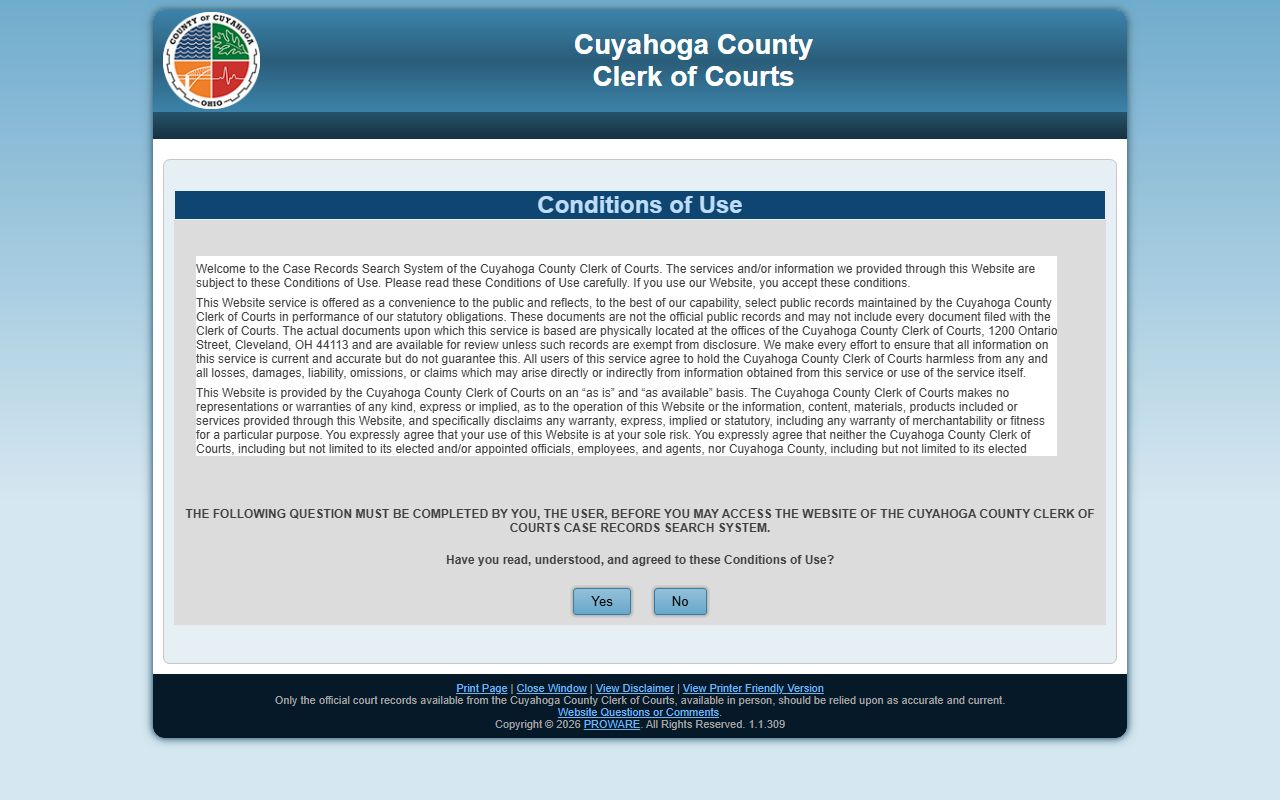
If the portal is down for maintenance, the Clerk says to try again later. The office has no set time to restore service. The terms also bar bulk downloads and block building custom URLs to pull documents, so the docket is meant for one case at a time, not data scraping.
Searching Dockets by Case or by Name
The portal gives you two main ways in. You can search by case number when you already know it, or by name when you do not. A case-number search is exact and fast. A name search is broader and may return a list you have to sort through, which is why the role and year filters help. Pick the mode that matches what you have in hand.
Name searches use a long party-role list on the civil side. Roles run from Plaintiff and Defendant to Creditor, Debtor, Garnishee, Receiver, and Guardian ad Litem. The appellate side keeps it simple with Appellant and Appellee. If you are unsure of the role, search the name with a loose filter first, then narrow.
| Search Path | Best When | What You Need |
|---|---|---|
| Search by Case | You have the case number | Category, year, and case number. |
| Search by Name | You only know a party | Party name and, if known, a role. |
| Foreclosure Search | Tracking a property case | Parcel number works better than a name. |
| Court of Appeals Search | Following an appeal | Case number or appellant/appellee name. |
Foreclosure is the path people miss. It is not a plain name search. The portal exposes a parcel number field, so a property owner can pull the case by parcel faster than by sorting common names.
What Cuyahoga County Court Dockets Show
A docket entry is short but packed. It carries a date, a filing type, and a brief description. Over a case, the entries form a paper trail from the first filing to the final judgment. A criminal docket adds bond entries, plea entries, and sentencing. A civil docket adds motions, orders, and cost entries. The table below maps the parts of a typical Common Pleas docket entry.
| Docket Field | What It Shows |
|---|---|
| Entry Date | When the filing or order was docketed. |
| Filing Type | Complaint, motion, journal entry, notice, or order. |
| Filed By | The party or court that made the entry. |
| Description | A short summary of the filing or ruling. |
| Hearing Date | Any set date for a hearing or trial. |
| Image / Document | A link to the document, where one is posted. |
A few entry types come up again and again. A journal entry is the official record of a ruling. A continuance pushes a hearing back. A capias or bench warrant is an order to take a person into custody, often for a missed date. Reading these in order is how you follow a case from filing to disposition.
Not every document is online. The Clerk terms say the web docket is a convenience copy and may not include every filed document. The official file stays at 1200 Ontario Street and controls if the two ever differ.
Civil and Criminal Docket Categories
Civil and criminal dockets read differently. A civil docket follows a dispute over money or rights, with a complaint, answers, motions, and a judgment. A criminal docket follows a charge, with an arraignment, bond entries, pleas, and a sentence. The Clerk's civil categories cover Board of Revisions, Garnishment, Judgment Lien, Miscellaneous-Claims, and Special Docket cases.
- Civil - General lawsuits and money claims.
- Foreclosure - Mortgage and lien cases, searchable by parcel number.
- Garnishment - Collection of a judgment from wages or accounts.
- Criminal - Felony cases with bond, plea, and sentence entries.
- Special Docket - Focused civil dockets, including the commercial docket.
The Special Docket category is where the Common Pleas Commercial Docket lives. That docket handles business disputes such as trade-secret claims, non-compete fights, and shareholder cases, with judges assigned for consistent handling. For the full case file behind any of these dockets, see Cuyahoga County court records.
Appeals and Probate Dockets
The Eighth District Court of Appeals docket is part of the same Clerk portal. Use Court of Appeals Search by Case or by Name. Appellate dockets list the notice of appeal, the briefs, the oral-argument date, and the decision. The Eighth District is the largest and one of the busiest appellate courts in Ohio, with twelve judges who sit in randomly assigned three-judge panels.
Probate is different. The Probate Court runs its own Docket and Index Search for estates, guardianships, and name changes at probate.cuyahogacounty.gov/pa/. It has its own terms page and its own warning to verify results against the official file. Probate also notes that most of its records, including electronic data, are public under Ohio law, subject to statutory exceptions.
So a docket search depends on the court. Common Pleas, Domestic Relations, and appeals share one portal. Probate uses another. A person tracking an estate should start with probate records, not the Clerk's criminal or civil docket.
How Current a Cuyahoga County Court Docket Is
The docket updates as filings are processed, but it is not a guaranteed live feed. The Clerk disclaims any promise of currentness or accuracy and warns of scheduled and unscheduled outages. So a brand-new filing may not appear the moment it is handed in.
E-filing adds a twist. The Clerk makes newly e-filed, non-confidential civil complaints available right away under "Submitted Efiling Complaints," before its quality-assurance review is done. Once review is complete and the complaint is compliant, it posts as filed on the main case system. Until then, treat a submitted complaint as pending, not final, because the Clerk is not responsible for one that is later rejected.
Note: A submitted e-file complaint can show on the docket before the Clerk's review is complete, so confirm a filing's final status before you rely on it.
Dockets vs. Full Cuyahoga County Court Records
A docket is an index. A full case record is the stack of documents behind it. The docket might show "Motion to Dismiss filed" without the motion's text. To read the document, you click the image link if one exists, or you request the file from the Clerk. For court, licensing, or appeals, you often need a certified copy of the actual document, not a printout of the docket.
The split matters for cost and for proof. A docket printout is free to view but is not the official record. A certified copy carries the Clerk's seal and is what courts and agencies accept. Certified copies come from the Case Record Requests and Certified Copies Department at the Justice Center.
Note: A docket entry confirms that a filing exists, but the official document and the case outcome should be verified with the Clerk before you rely on them.
Cuyahoga County Court Dockets Removed From Online Access
Some dockets are kept off the web on purpose. The Clerk search page says domestic violence case information is no longer available through internet access, by federal law and direction of the Domestic Relations Court. Civil stalking protection order cases are also removed, by direction of the Common Pleas General Division. For these, the Clerk says to come in person or call the docket information line at 216-443-7950.
Juvenile dockets are restricted too and run through the Juvenile Court, where a Records Custodian reviews requests for confidential content before release. Sealed and expunged cases drop out of public view under ORC 2953.32. Adoption and mental-health matters in Probate are confidential by statute. So a missing docket is not always an error. It may be restricted by law.