
How to Search Cuyahoga County Court Records
The central portal is the Clerk of Courts Case Records Search System at cpdocket.cp.cuyahogacounty.gov. It covers the Court of Common Pleas General Division, the Domestic Relations Division, and the Eighth District Court of Appeals. The first screen is a "Conditions of Use" page with a "Yes" and a "No" button. You must click "Yes" to reach the search. The terms say the site is a convenience, the online documents are not the official record, and the official files sit at the Clerk's offices at 1200 Ontario Street. The system is an ASP.NET docket built around that terms gate. Do not expect a direct search box. The gate comes first, the search comes second.
Before you start, gather a party name, a case number if you have one, and the case type. The portal loads different fields once you pick a search mode, so choose the mode first. A criminal lookup needs "Criminal Search by Name" or "Criminal Search by Case." A civil lookup needs a civil mode. The wrong mode shows the wrong field group, which trips up many first-time users.
- Open the portal and click "Yes" on the Conditions of Use page.
- Select a search mode, such as Civil Search by Name or Criminal Search by Case.
- Enter the party name or case number the page asks for.
- Narrow by case category and year to cut down the result list.
- Open the matching case and read the docket, then request a copy if needed.
The search-selection screen is shown below from the official Clerk search page. It appears only after you accept the terms.
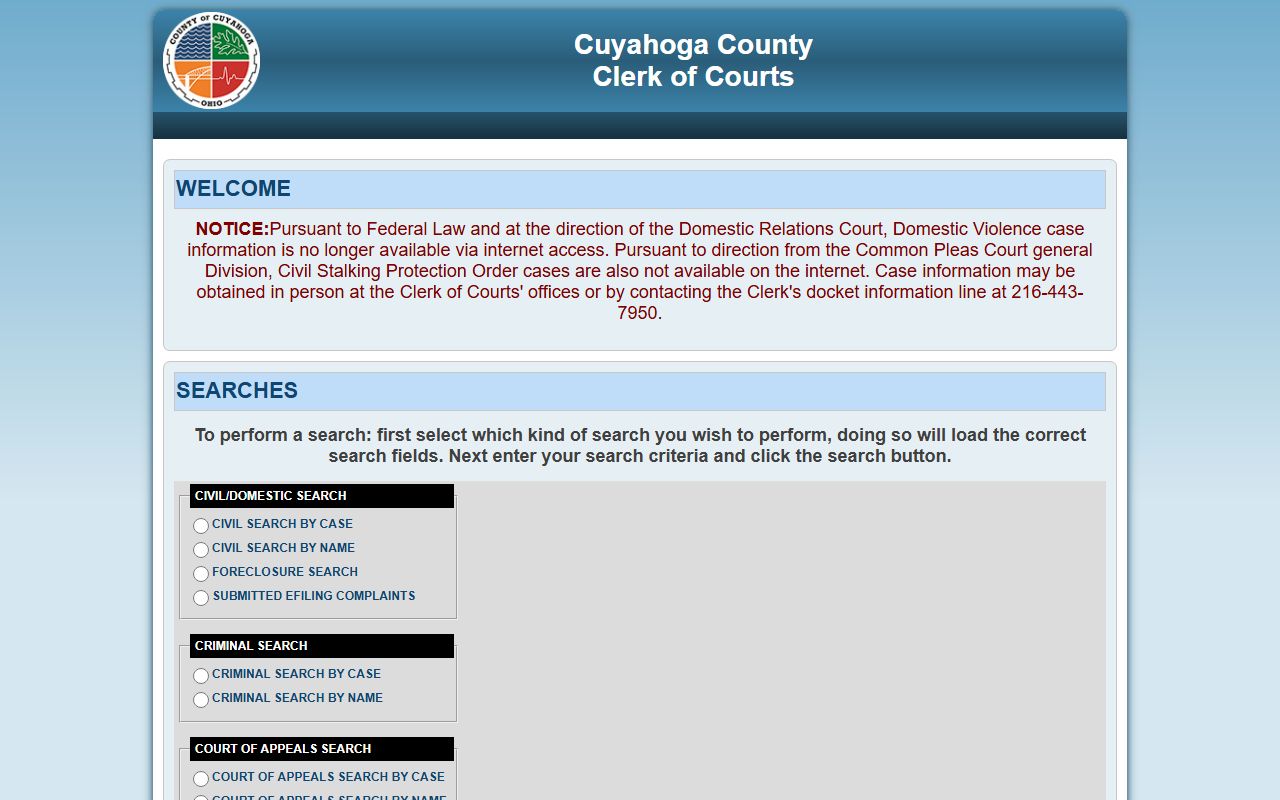
Pick the search type that matches your case. The wrong mode loads the wrong fields. If the portal is down, the Clerk warns of scheduled and unscheduled maintenance and says it has no set duty to restore service by any fixed time, so try again later or call the office.
Cuyahoga County Court Records Search Fields
Each search mode shows its own set of fields. Civil and criminal name searches ask for a party name and role. Case searches ask for category, year, and number. Foreclosure adds a parcel number. Because the field groups load on demand, the page never shows every field at once. Choose the search type first, and the site then loads the fields that fit it. The table lists the fields you will meet on the portal.
| Field Label | Type | Required | Notes / Format |
|---|---|---|---|
| Accept Conditions of Use | Buttons | Yes | Click "Yes" before any search loads. |
| Search mode | Radio | Yes | Civil, criminal, foreclosure, e-filing, or Court of Appeals. |
| Case Category | Dropdown | Conditional | Civil, Garnishment, Judgment Lien, Special Docket, and more. |
| Case Year | Dropdown | Conditional | Civil list goes back to 1950; criminal to 1980. |
| Case Number | Text | Conditional | Used for case-number searches. |
| Name | Text | Conditional | Search by party or defendant name. |
| Party Role | Dropdown | Conditional | Plaintiff, Defendant, Petitioner, Respondent, and many more. |
| Parcel Number | Text | Conditional | Foreclosure search field for property owners. |
The party-role list is long on the civil side. It runs from Plaintiff and Defendant to Garnishee, Receiver, Relator, and Guardian ad Litem. On the appellate side, the roles narrow to Appellant and Appellee. If you do not know the role, a name search without a tight role filter often works better.
Foreclosure is the field group people miss most. It is not just a name search. The portal exposes a Parcel Number field along with date filters. A property owner who knows the parcel number can pull a mortgage foreclosure case faster than by name. That tip alone saves a lot of guessing on common owner names.
Types of Cuyahoga County Court Records
The Clerk's case categories double as a record map. Civil covers lawsuits and money claims. Criminal covers felonies. Special dockets cover focused civil work. Domestic Relations covers family cases. The list groups the main types you can find through the county docket.
Probate, juvenile, and most city traffic cases are not in this portal. Those go to the Probate Court, the Juvenile Court, or the municipal court named on the paper. The Clerk FAQ sends Cleveland traffic and parking tickets to Cleveland Municipal Court, and each other city in the county keeps its own municipal docket.
- Criminal records - Felony indictments, bonds, pleas, and sentencing in Common Pleas.
- Civil records - Complaints, answers, motions, and judgments.
- Foreclosure and lien records - Mortgage foreclosures, judgment liens, garnishments.
- Domestic Relations records - Divorce, support, and parenting files.
- Appeals records - Eighth District briefs, decisions, and original actions.
Civil felony and family files are not the whole picture. The Common Pleas Commercial Docket is a special civil docket for business disputes, such as trade-secret claims, non-compete contracts, and shareholder fights. Those cases still show up through the civil search, often under the Special Docket category. For a deeper look at how a docket reads, see Cuyahoga County court dockets.
What Cuyahoga County Court Records Show
A docket lists every filing and order in date order. The Clerk's field design shows how the office sorts a record: by category, year, number, party, and role. A typical case page shows the parties, the judge, the filing date, and a string of docket entries. Criminal files add bonds, plea entries, and sentencing. Civil files add motions, judgments, and cost entries. The table below maps the common fields to what they mean.
| Field | What It Shows |
|---|---|
| Case Number | The case ID tied to category and year. |
| Case Category | Civil, criminal, domestic relations, or appeals. |
| Parties | Plaintiff and defendant, or appellant and appellee. |
| Filing Date | The date the case or filing was entered. |
| Docket Entries | Motions, orders, hearings, and journal entries. |
| Disposition | The outcome and any judgment or sentence. |
Some terms in a docket trip people up. A motion is a written request for an order. A journal entry is the official court entry that records a ruling. A disposition is the outcome of the case or a charge. A capias or bench warrant is an order to bring a person in, often after a missed court date. Knowing these helps you read what a case page is telling you.
The terms warn that online documents are not the official record and may not include every filed document. For a complete file, check with the Clerk. The official paper records sit at 1200 Ontario Street and stay the controlling version if the online copy and the file ever disagree.
E-Filed Complaints and New Cuyahoga County Court Records
New cases move into the docket through e-filing. Authorized users with valid accounts can file pleadings in existing cases or open new cases online through the Clerk e-filing system. A clerk reviews each submission and accepts or rejects it, and the filer gets an email with the decision. If a deposit is due, payment is collected at filing.
There is a timing quirk worth knowing. The Clerk search page makes newly e-filed, non-confidential civil complaints available right away, before the office finishes its quality-assurance review. You can find these under "Submitted Efiling Complaints." Once review is done and the complaint is compliant, it posts as filed on the main Case Information Online system. Until then, treat it as a submitted filing, not a final one.
Note: A submitted e-file complaint shown before review is not yet a confirmed filing, and the Clerk is not responsible for one that is later rejected for not meeting the rules.
Public Access Framework for Cuyahoga County Court Records
Court records in Ohio are presumed open. The Ohio Public Records Act, ORC 149.43, gives any person the right to inspect and copy public records. The Ohio Attorney General sums the law up as access for "any person." Court files add the Ohio Rules of Superintendence, Sup.R. 44 through 47, which define a court record and set access rules. The Clerk's policy follows both. You do not have to give your name or say why you want a record.
The Clerk also flags a practical limit. The portal is built for the general public, not for large-quantity copy requests. The terms bar bulk downloads, block bypassing the query tools, and forbid building custom URLs to pull documents straight from the system. So the docket is fine for case-by-case lookups, but it is not a data feed.
Copy costs are set by ORC 2303.20. Legal Division plain copies are free under 33 pages and $0.03 per page over that. Mailed records may add postage. The Clerk may ask for payment up front. For records the office keeps outside the court docket, the same open-records rules apply, and the public records page covers how those requests work.
Note: A public-records request does not need special wording or your identity, but it must describe the records clearly enough for the office to find and review them.
Records That Are Sealed or Confidential in Cuyahoga County
Not every case is open. The Clerk search page says domestic violence case information is no longer available online, and civil stalking protection order cases are removed too. Juvenile files are reviewed before release. Adoption files are confidential under ORC 3107.17, and mental-health files are restricted under ORC 5122.31. Sealed and expunged cases drop out of public view under ORC 2953.32.
Sealing and expungement are not automatic. The Common Pleas expungement page says a person must meet statutory eligibility, the waiting period must have passed, and there can be no pending charges. Dismissed cases, not-guilty findings, and grand-jury no-bills can also be sealed, but an application is still needed. If the court approves, it orders the records sealed and the index references deleted. The Public Defender may help people who cannot afford counsel.
To view a sealed record, you generally need a court order from the court that handled the case. For removed protection-order or domestic violence cases, the Clerk says to come in person or call the docket information line at 216-443-7950. A judge weighs the request against the privacy and safety reasons for the restriction. For the arrest side of a criminal matter, the arrest records page explains what is public and what is not.
In-Person and Certified Cuyahoga County Court Records
You can review official files at the Clerk's office during business hours. There is a real difference between a plain public-records copy and a certified copy. A plain copy is fine for reading or reference. A certified copy carries the Clerk's seal and is the version courts, licensing boards, and immigration offices accept as proof. Certified copies come from the Case Record Requests and Certified Copies Department.
Bring or include the case number, party names, the year, and the document you need. The more exact the request, the faster the office can pull and review the file. For office hours, division phone lines, and request methods, the Clerk of Courts page has the full directory.
Clerk of Courts - Certified Copies
1200 Ontario Street, 1st Floor
Cleveland, OH 44113
216-443-7977
Mon-Fri 8:30 a.m.-4:30 p.m.